Charm mPHR
- 4.3
- Rating
- 50.00K
- Installs
- Free
- Price

 Analysis by App-foxy
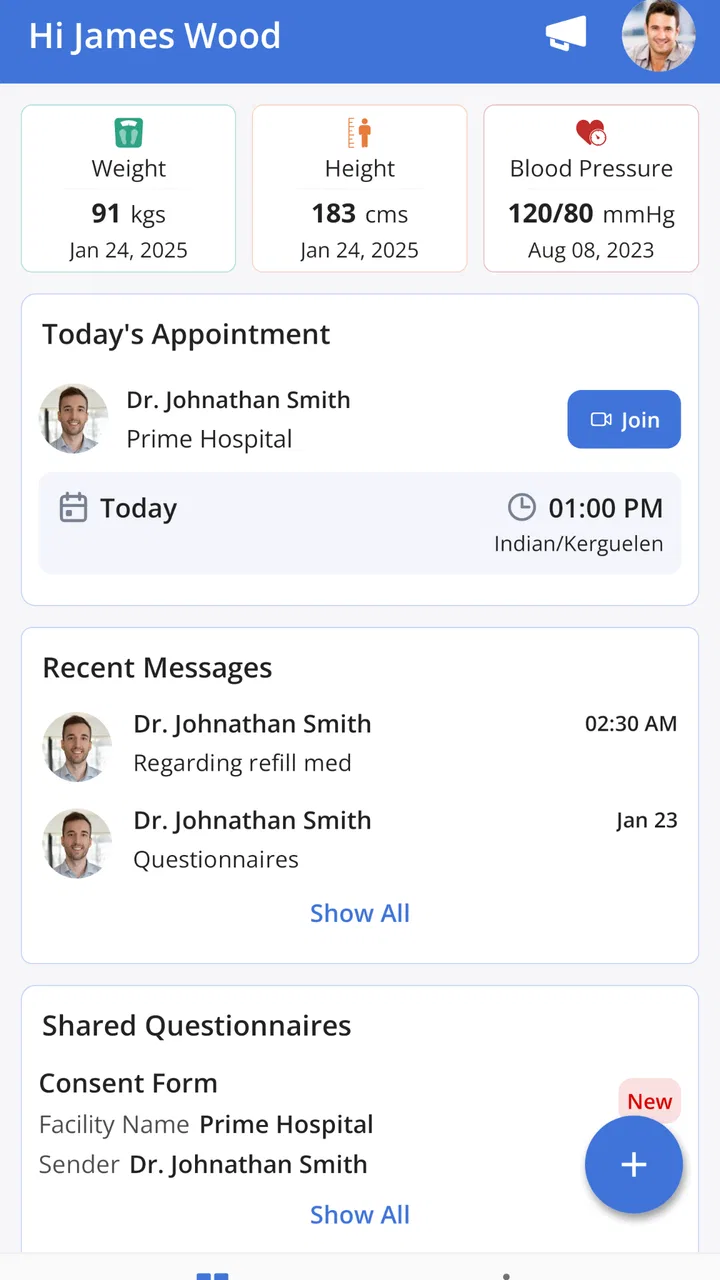
Managing healthcare often means juggling appointment details, messages, and information spread across different places. Charm mPHR is designed to bring those parts together for patients connected with a participating practice. I found its appeal less in flashy extras and more in the simple idea of having a direct patient-facing route to appointments, practice messages, and a shared health record.
That focus makes it a very different kind of medical app from a symptom checker, fitness tracker, or general medication reminder. It is a companion to the healthcare practice using the Charm system. If your clinic supports it, the app can become a convenient place to keep up with routine communication. If your provider does not use the relevant system, its usefulness is naturally much more limited.
What Charm mPHR is really for
Charm mPHR comes from Charm Health Apps / MedicalMine and sits in the medical category. Its central purpose is patient access: checking appointments, communicating with the practice, and viewing the health information that the practice shares through the record. I would describe it as a patient portal in app form rather than a complete personal health-management suite.
You May Also Like

 Blood Strike: 2.5 Anniversary
Blood Strike’s Loadouts Turn Every Drop Into a Tactical Gamble
A close look at Blood Strike’s custom loadouts: how fast access to signature weapons reshapes its battle royale rhythm, rewards preparation, and narrows the gap between fights.

 Pandora - Music & Podcasts
Pandora’s Music Is Easy to Start, but Harder to Recover
Pandora’s strength is its low-effort path from a seed to a station. Its weak spot is how much confidence it asks you to place in connection, setup, and quiet recovery.

 8 Ball Pool
 Is Built on Rivalries, Rematches, and Routine
A close look at the rivalries, rematches, shared routines, and unanswered safety questions that turn a quick pool match into a persistent mobile community.

 Samsung Music
’s Quiet Strength Is Playing What You Already Own
Its reach comes less from spectacle than from dependable access to a personal library. That simplicity is both the app’s strongest retention engine and its ceiling.

 AccuWeather: Weather Radar
AccuWeather Review: A Quick, Clear Forecast for Everyday Decisions
For everyday plans, the best forecast is the one you can understand quickly. AccuWeather makes rain timing, radar, and local conditions easy to act on, with a few trade-offs.

 Hill Climb Racing
Why Hill Climb Racing Still Turns Crashes Into One More Run
A tiny car, a bumpy hill and one more upgrade: Hill Climb Racing keeps resurfacing because its simple chaos makes every near-miss feel personal.
More From Our News Desk
View All News


The distinction matters. A patient portal is most useful when it is connected to the people and organization already handling your care. It is not meant to replace a clinician, diagnose a condition, or act as an emergency service. I would still use the appropriate emergency channel for urgent symptoms, and I would not treat an in-app record as a substitute for professional advice.
The app is free, which removes the most obvious financial barrier to trying it. That does not mean every healthcare interaction becomes free; the app is an access tool, not a promise about consultation charges, treatment costs, or insurance. Its value comes from making existing practice communication easier to reach, rather than from selling a separate medical service.
It is rated for Everyone, and the minimum operating-system requirement is Android 6.0. The current version is 1.6.6. Those details suggest that people with older compatible Android devices may still be able to use it, although the practical experience can depend on how well an older phone handles current app behavior and the practice’s connected services.
How the shared record changes everyday use
The shared health record is the feature I would pay the most attention to before installing. It can reduce the need to search through email threads or paperwork when you want to review information your practice has made available. That is especially useful after a visit, when remembering instructions and checking what was documented can otherwise become a small but persistent chore.
There is an important nuance here: “shared” does not mean the app automatically becomes a complete archive of every health event in your life. The useful information is the information made available through the connected practice. If you see several providers using unrelated systems, you may still need more than one portal, and some records may remain outside Charm mPHR.
That limitation is not a flaw unique to this app; it is a common weakness of practice-linked portals. Still, it affects the buying decision. Since the app is free, the real question is not whether it costs money, but whether your own provider connection makes it worthwhile.
A realistic appointment and message workflow
Imagine that you have a follow-up visit coming up and cannot remember whether the practice changed the time. Instead of searching old messages or calling during office hours, you can open the app and check the appointment area. If you need to clarify a non-urgent point, the messaging function gives you a more organized route than sending a message to a general office address.
That workflow is particularly helpful for people who manage care for a family member, attend recurring appointments, or tend to lose paper instructions. I also see value after a consultation: reviewing the shared record later can help you prepare a more accurate question for the next conversation with the practice.
The trade-off is that messaging is not the same as live support. A practice may answer according to its own workflow, and a patient should not assume that a message will be seen immediately. I would use it for ordinary administrative or follow-up communication, not for symptoms that need rapid attention.
Small habits that make the app more useful
My first practical tip is to check the app before contacting the practice about an appointment. You may find the relevant detail already available, which avoids an unnecessary call and gives you a clearer starting point if something genuinely needs correction.
My second tip is to use the shared record as a preparation tool rather than only as an archive. Before a visit, review what is visible and write down the questions that arise. This can make a short appointment more productive, particularly when several concerns have accumulated.
A third useful habit is to keep expectations narrow when sending a message. Put one administrative request or one clearly described non-urgent question in a message instead of combining unrelated issues. That makes it easier for practice staff to understand what you need and reduces the chance that an important point is buried in a long paragraph.
Finally, I would still keep a personal backup of information that matters during travel or a transition between providers. A portal is convenient, but relying on one app as the only place you remember a medication detail, appointment instruction, or contact route can create avoidable stress if access is temporarily inconvenient.
Where the free access delivers genuine value
Because there is no purchase price, Charm mPHR can offer good practical value to an existing patient who wants fewer small barriers between them and their practice. The strongest benefit is convenience: appointments, messages, and shared information are gathered in one patient-oriented destination instead of being handled through disconnected routines.
I would not measure its value by the number of tools it contains. A focused portal can be more useful than a crowded medical app if it solves the exact problem you have. For someone who frequently forgets appointment details or dislikes calling for simple questions, that focused design may save time and reduce friction.
The free model also makes it reasonable to try without committing money. That is different from saying it has unlimited value for everyone. If your practice rarely updates the portal, if you prefer phone conversations, or if you already have a better-connected patient system, installing another app may add clutter rather than convenience.
The app’s audience size gives some context: it has passed fifty thousand installs, with an average rating of 4.4 from around two hundred ratings. I would read that as a sign of generally positive reception, while remembering that patient-portal satisfaction often depends heavily on the individual practice’s responsiveness and setup. The app can provide the doorway, but the quality of the experience also depends on what is available behind it.
Trade-offs compared with usual alternatives
The most obvious alternative is contacting the practice by phone. Calling remains better when the matter is urgent, complicated, or likely to require a back-and-forth conversation. Charm mPHR is more attractive for checking information and sending a clear, non-urgent request without waiting on hold.
Email can feel familiar, but a practice-linked portal is usually a more appropriate place for healthcare communication than a personal inbox. The app’s advantage is that the conversation and shared record are tied to the patient relationship rather than scattered among ordinary emails. I would still avoid assuming that any digital channel is suitable for highly sensitive detail unless the practice has directed you to use it.
A web-based patient portal may provide much of the same access. On a larger screen, a browser can be easier for reviewing lengthy information or handling several tasks at once. The app is preferable when you want a dedicated mobile entry point and do not want to remember a website route every time you need an appointment or message.
General health apps are better for tasks such as tracking habits, logging symptoms for your own reference, or collecting information from multiple unrelated sources. Charm mPHR is better when the goal is interaction with a connected practice. Trying to use it as a general-purpose health diary would be choosing the wrong tool.
Who is most likely to benefit
I think the best fit is a patient whose practice actively uses the Charm-connected system and regularly shares appointments, messages, or record information there. The benefit is also clear for people who prefer written communication, want to review details after a visit, or coordinate recurring care without relying entirely on phone calls.
It may be especially useful for someone who is responsible for keeping track of a relative’s appointments, provided the practice’s patient-access arrangements support that situation. The app does not magically solve authorization or account-management questions, so I would confirm the practice’s process before assuming one account can handle another person’s care.
People who move between several unrelated healthcare providers should approach it with more modest expectations. It can still be valuable for the participating practice, but it is unlikely to replace every portal or record source in a fragmented care journey.
I would skip it if your provider does not support the service, if you need emergency communication, or if your main goal is self-directed health tracking rather than practice access. I would also choose a browser or phone call when a long, complicated discussion is easier to manage outside a compact mobile interface.
Questions worth answering before relying on it
Will it show every medical record you have? I would not assume that. The relevant record is the information shared by the connected practice, so people with multiple providers may still need other systems or personal records.
Can it replace a phone call? For routine appointment checks and clearly written non-urgent messages, it may reduce calls. It should not replace urgent communication, and it may not be the fastest option when a situation needs immediate clarification.
Does free mean there are no healthcare costs? No. The app itself is free, but consultations, tests, treatments, and other services are separate matters handled by the healthcare provider and your coverage arrangements.
Is it useful without a participating practice? Its main functions depend on the practice connection, so the app makes the most sense after confirming that your provider uses the relevant system. Installing it first and discovering that your clinic is not connected would offer little practical benefit.
Is the mobile app always better than the web or phone alternative? Not necessarily. The app is convenient for quick checks and messages, while a browser may be better for extended review and a phone call remains preferable for urgent or nuanced issues. The right choice depends on the task, not loyalty to one channel.
My verdict on Charm mPHR
Charm mPHR is worth trying when your practice supports it and you want a free, straightforward route to appointments, messages, and shared health information. I like its focused role: it does not pretend to be a complete medical universe, and that can make it easier to understand and use.
Its biggest strength is practical access, not advanced personal tracking. Its biggest weakness is the dependency on the connected practice. A responsive clinic can make the app feel genuinely useful, while an inactive or poorly integrated portal can leave it feeling like an empty extra on your phone.
With 49 reviews alongside its broader rating history, the app has a smaller public feedback footprint than the most familiar consumer platforms, so I would judge it primarily by your provider’s support and your own workflow. The developer is Charm Health Apps / MedicalMine, and the app has been available since June 26, 2020, giving it an established presence rather than the feel of a brand-new experiment.
My recommendation is simple: if your clinic points you toward it, install it and use it as a practical companion for routine care. Check appointments before calling, review shared information before visits, keep messages focused, and never use it for emergencies. If you want a universal health dashboard or a tool for independent wellness tracking, choose something built for that purpose instead.
FAQs for Charm mPHR
01What is Charm mPHR and how does it benefit me?
Charm mPHR is a mobile Personal Health Record app that allows users to manage their health information conveniently. It benefits users by providing easy access to medical records, medication details, and doctor appointments. This app empowers users to take control of their health, ensuring they are informed and prepared for medical consultations.
02Is my personal health data secure with Charm mPHR?
Yes, Charm mPHR prioritizes user privacy and data security. The app uses encryption protocols to protect your health information from unauthorized access. Additionally, it complies with healthcare regulations such as HIPAA, ensuring that your personal data is handled with the utmost confidentiality and care.
03Can I share my health records with my doctor using Charm mPHR?
Absolutely. Charm mPHR allows you to share your health records with healthcare providers seamlessly. You can send your medical history, test results, and medication lists directly from the app, facilitating better communication and more informed decision-making during medical consultations.
04Is Charm mPHR compatible with both Android and iOS devices?
Yes, Charm mPHR is available for download on both Android and iOS platforms. The app is designed to offer a smooth user experience across various devices, ensuring that you can access and manage your health information anytime, anywhere, regardless of your smartphone's operating system.
05Do I need internet access to use Charm mPHR?
While Charm mPHR does require an internet connection to update and synchronize your health data, many features can be accessed offline. You can view previously synced information and manage your records without internet access, ensuring that you always have vital health details at your fingertips.
Pros
- User-friendly interface enhances navigation.
- Comprehensive health tracking features.
- Customizable alerts for medication reminders.
- Secure data encryption for privacy.
- Integrates with wearable devices seamlessly.
Cons
- Limited customer support options.
- Requires stable internet connection.
- Occasional sync issues with devices.
- Some features locked behind paywall.
- Limited language support in app.

Charm mPHR
Gallery